
Read and annotate
Use one Markdown file for a compact reference. Add your own comments while retaining the source information.
Export headings, text, lists and supported tables to Markdown, keeping the source URL and retrieval time. Choose one file or a note per page, then use it yourself in an editor or an AI tool of your choice. Free covers one page; collecting several pages is Pro.
Free: one page per run. Nothing is sent to an AI automatically; you decide where to paste it.
Read headings, text and links
Check the required documents.
| Item | Value |
|---|---|
| A | 120 |
| B | 180 |
example.org/guide
Prepare Markdown
# Application guide
Check the required documents.
- Form
| Item | Value |
| --- | --- |
| A | 120 |
| B | 180 |
[Source](https://example.org/guide)
Copy or import it yourself
Manual handoff
Application guide
Summarize the requirements and cite the source.
Manual reuse in notes or external AI. Image references do not mean every image file is bundled.
Files actually saved by Grab All Files 5.8.20 from fictional pages hosted on this site, with the settings used and each file’s hash. Free samples come from the released build; Pro samples from a developer build of the same source.
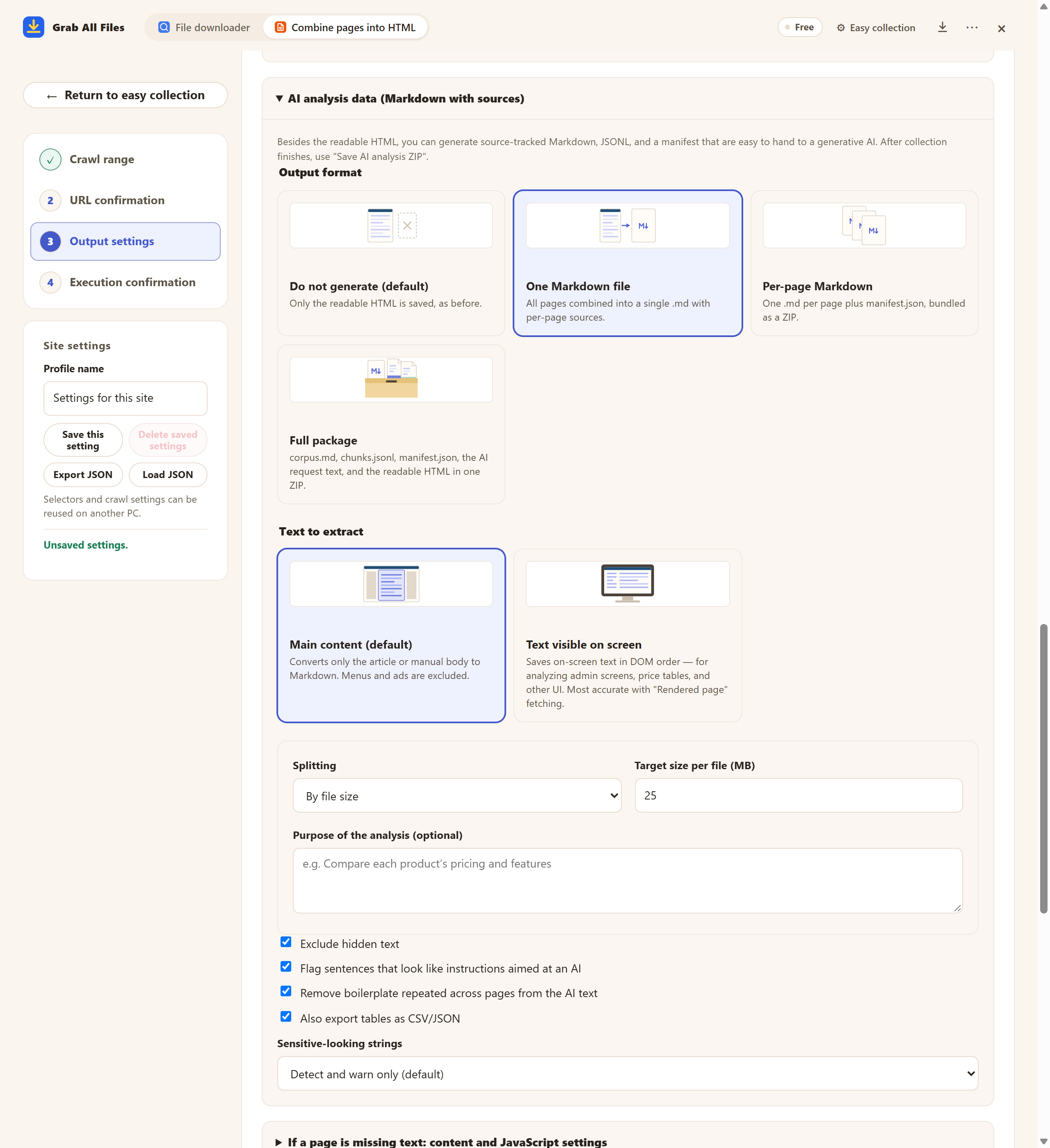
Actual extension screen using sample materials. Markdown output format settings. A Free example with one selected page, showing settings and controls before saving. Pro combines multiple selected pages as described in this guide.
Open the full-size image ↗


Pictures and names are the extension’s own cards.
Use one Markdown file for a compact reference. Add your own comments while retaining the source information.
Use per-page Markdown to group sources by topic and link them from your own research or writing notes.
Summarize the points stated in these pages. Link each point to its source URL and separate source wording from my own observations.
List the facts that support this draft. Include source URLs and capture dates, and mark claims that the supplied material does not support.
| Format | When to use it |
|---|---|
| One Markdown file | Collected text in one reading file with per-page sources; large text may be split. |
| Per-page Markdown | A Markdown file for each page plus manifest.json in a ZIP, useful for separate source notes. |
| Full package | corpus.md, chunks.jsonl, manifest.json, request text and readable HTML in a ZIP for structured reuse. In a full package, reading HTML is included. In masking mode, HTML is not included. |
| HTML / original documents | Keep the readable reference and any needed original attachments beside your Markdown. |
Export files first, then manually copy or import them using the destination’s supported method. Check headings, tables and links after import. The extension does not automatically sync a vault or workspace, and import support varies.
Markdown can reference images using their original URLs; image files are not always included in the package. Extraction is not a complete site clone. Review important images and content that depends on interaction at the original page.
The default 25 MB is a splitting target for Markdown text. It does not guarantee the total ZIP size or acceptance by another tool. Extract the ZIP and select or split the files to match the destination’s limits.
Successfully extracted text from selected supported documents can enter AI output. Keep needed originals separately and review unreadable or missing text; scanned material is not guaranteed to be extracted. Document text is not merged into the readable HTML.
No. Export prepares files on your device. You choose an external service and manually provide supported files and your question. Keep source_url and captured_at when checking answers; a capture date does not prove that the source is still current.
Yes. Free saves one chosen page per run. Images on that page have no plan limit, and its directly linked files are saved 10 at a time with “Save the next 10” on the result screen. Pro ($19.99 one-time, up to 3 devices) combines multiple selected pages into one HTML.
Collection uses your own browser session and does not collect credentials. If a page is marked “Sign-in needed”, press “Open the site to sign in”, sign in in that tab, then press “Resume”. Pages that still need a sign-in are not saved, and the result says how many were left out.
Some sites add text only after you scroll or click. Open “If a page is missing text: content and JavaScript settings”, turn on “Scroll down to load content that appears later” or “Press ‘Show more’ to include the continuation”, and collect again. If the wrong part of the page was kept, use “Select on screen” there to pick the main text.
Free saves up to 10 files per download in the file downloader, and one chosen page per run when you combine pages into HTML; that page’s linked files are saved 10 at a time with “Save the next 10”. Pro ($19.99 one-time, up to 3 devices) removes the per-download cap and combines multiple pages into one HTML.