
What Grab All Files can and cannot do, with the numbers.
Grab All Files is a browser extension for Chrome, Edge and Firefox. It finds files on web pages and saves pages as HTML. This page lists its limits, what Free and Pro change, and the pages and files it cannot save, with the kind of tool to use for those.
The limits
Pro is US$19.99, paid once, with no subscription, and one license works on up to 3 devices. Free needs no credit card.
| Item | Number | What it counts | Free and Pro |
|---|---|---|---|
| Files saved in one go (file downloader) | 10 on Free; no cap on Pro | The files you select for one save: download, ZIP, PDF merge or CSV. On Free you select the next 10 and press the button again. | This is the difference between the plans for the file downloader. |
| Pages saved in one run (page collector) | 1 on Free; as many as you select on Pro | Pages saved into the HTML. On Free you pick one candidate; you can add pages one at a time to the HTML you saved last time. | Over 100 pages on Pro, it first asks whether to pause every 100 pages. |
| Linked files saved with the HTML | 10 on Free; 100 on Pro, per run | PDF, Word, Excel and similar files that the saved pages link to. A button on the result screen saves the next batch. | On Pro it asks first when more than 100 are linked. |
| Pages in one crawl | 100,000 | How many pages one crawl will read when it looks for files or for candidate pages. sitemap.xml and robots.txt are read too. | Same on both plans. |
| Crawl depth | This page only, depth 1 to 5, or unlimited | How many link levels it follows from the starting page. The depth works inside the folder the starting page is in. | Same on both plans. |
| Size of one ZIP | 256 MB | A confirmation appears above 200 MB in total. It does not split a ZIP into parts. | Free also stops at 10 files per ZIP. |
| Pages followed by “Next” while scanning | 6, 20 or 100 pages | Pro only. The scan scrolls to the end by itself and follows the “Next” pages of the same list. The number follows the “Scroll time” setting: 45, 90 or 180 seconds. | Free reads what is on screen, so scroll to the end yourself first. |
| Devices | 3 | One Pro license can be activated on up to 3 devices. | Pro only. |
What the “100” on Pro is, and what it is not
Pro does not have a limit on how many files you download. Its 100 is the number of linked files saved next to the HTML per run in “Combine pages into HTML”: the PDFs and Office files that your saved pages point to. Free saves 10 of those per run. If more are linked, the result screen has a button for the next batch.
Two other numbers are easy to confuse with it. 100,000 is the page limit of one crawl, and 100 is also the number of “Next” pages a Pro scan follows with the longest “Scroll time” setting. All three are separate settings.
What it can do
| What | Detail |
|---|---|
| List the files on a page and save the ones you pick | It detects 708 file types in 38 categories, including PDFs inside an iframe, lazy-loaded images, and files loaded through fetch/XHR or blob URLs. You filter, sort and search the list before saving. |
| Save Office files, video files and audio files | Word, Excel and PowerPoint files, and video and audio files that the page links to directly. Same on Free and Pro. |
| Follow links to find more files | From the page only to unlimited depth, up to 100,000 pages per crawl. |
| Make a ZIP, merge PDFs, export a file list | All of it runs in your browser. The main CSV columns are URL, file name, title, type, size and the page each file came from. |
| Save pages as HTML | Four forms of saved file and two looks, “Easy to read” or “Keep the original look”. Each saved page can carry its source URL and the time it was captured. |
| Save pages you see after signing in, and pages built by JavaScript | It saves what your browser displays, using your existing sign-in. It does not store your password and does not get past a CAPTCHA. |
| Read feeds to the end, on sites it was checked on | On sites it was checked on (X posts and replies, YouTube comments, Reddit, Bluesky, Yahoo! News comments), timelines and comment lists are scrolled to the end with no cap on the number of posts, and it asks whether to continue every 1,000 posts. On other pages it scrolls up to 10 times by default and then stops. |
| Work on your computer | Pages and files go from the source site to your computer. They are not sent to the developer's server. |
Where the 10-file limit is stated
On Free, a note under the save button gives the limit and says how to continue.
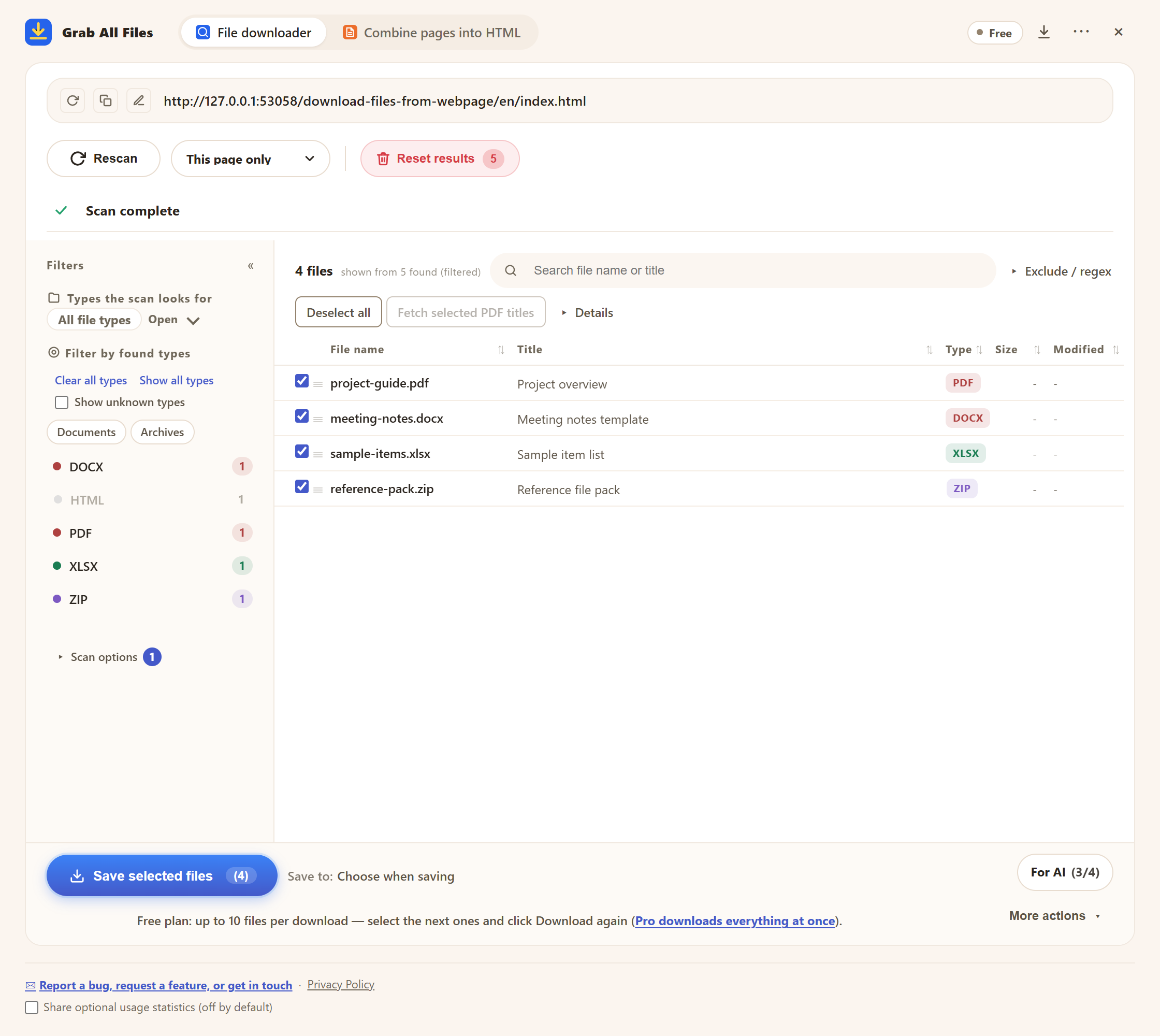
The real file downloader on the Free plan. The note under the save button says Free saves up to 10 files per download, and to continue you select the next files and press the download button again.
What it cannot save, and what to use instead
The first column is what Grab All Files does not save. The last column names a kind of tool, not a product.
| Cannot save | What happens | A kind of tool that fits |
|---|---|---|
| Browser internal pages (chrome://), the Chrome Web Store and Edge Add-ons pages, file:// pages | It does not run there. | For HTML files already on your computer, the “From a computer folder” option in Combine pages into HTML reads a folder or ZIP of them. Otherwise, the browser's own Save page as. |
| Files behind DRM or an encrypted viewer | The file cannot be read. | A download that the publisher itself offers, if one exists. |
| The inside of the browser's built-in PDF viewer, text in a closed Shadow DOM, text drawn only on a canvas | The text cannot be read as text. | Saving the screen as an image, or the browser's print to PDF. |
| An iframe from another domain you have not allowed | Not read until you allow it. Once allowed, it can be read. | No other tool needed: allow the site when the browser asks. |
| Streamed video (HLS .m3u8, DASH .mpd), blob: playback, play URLs with no file extension, videos on streaming sites | It does not save these, does not get around DRM or watermarks, and does not record streams. | The download feature the video's publisher provides, where there is one. |
| Pages you cannot sign in to or are not permitted to see | It uses your browser's access and cannot add to it. | Ask the owner for the files, or use the publisher's bulk download or API. |
| Thousands of pages, or only the files that changed since last time | It works page by page inside the browser, so it is slow at that size and has no update-only mode. | A desktop website copier. |
| Large sets of papers or public data | Possible in small sets, but not the right tool for a whole corpus. | The source's bulk download or API, when it has one. |
Related guides
- Crawler vs page saver vs download managerThe same limits seen as a comparison of methods.
- Chrome, Edge and FirefoxWhat differs on Firefox.
- Grab All Files FAQShort answers on price, privacy and permissions.
FAQ
How many files can I download at once on the free plan?
10 files per save. The same limit applies to a ZIP, a PDF merge and a CSV made from the selection. Select the next 10 and press the button again to continue. Pro has no cap on the number of files.
Is Pro limited to 100 downloads?
No. The file downloader has no file-count cap on Pro. The 100 is the number of linked files saved next to the HTML in one run of “Combine pages into HTML”. A button on the result screen saves the next batch.
How many pages can it crawl?
Up to 100,000 pages in one crawl, at depth “This page only”, 1 to 5, or unlimited. It also reads sitemap.xml and robots.txt.
How large can a ZIP be?
256 MB. Above 200 MB in total a confirmation appears. It does not split a ZIP into several files, so select fewer files if you hit the limit.
Can it save streamed video?
No. It saves video files that a page links to directly, such as .mp4 or .webm. It does not save HLS or DASH streams, blob: playback or videos on streaming sites.
What should I use for a site with thousands of pages?
A desktop website copier. Grab All Files reads one page at a time inside your browser. That is how it can save pages behind a sign-in and pages built by JavaScript, and it is also why it is slow once a site runs to thousands of pages.
Try Grab All Files on your browser.
Free saves up to 10 files per download in the file downloader, and one chosen page per run when you combine pages into HTML; that page’s linked files are saved 10 at a time with “Save the next 10 files”. Pro ($19.99 one-time, up to 3 devices) removes the per-download cap and combines multiple pages into one HTML.