
Grab All Files: frequently asked questions.
Answers to the questions people ask before installing a browser extension that reads web pages: what it sends, what it costs, what it needs access to, and what it does not do. Each answer is short and gives the actual numbers.
In three points
Grab All Files finds files on web pages and saves pages as HTML, in Chrome, Edge and Firefox. Processing happens in your browser; page content, URLs and file names are not sent to the developer.
Free needs no credit card. Pro is US$19.99, paid once, for up to 3 devices.
It does not save streamed video, and it is not built for copying thousands of pages.
Where the work happens
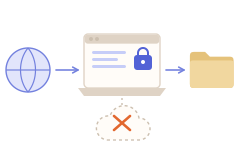
Permissions in full
Every permission, why it is needed, and what is sent to the developer's server is listed on the security page of this site, at /security.html.
Read next
- What it can and cannot doEvery limit in one table.
- Crawler vs page saver vs download managerHow it differs from other kinds of tool.
- Chrome, Edge and FirefoxWhere to get it, and what differs on Firefox.
FAQ
Is Grab All Files safe to use?
It scans only the page or URL you choose, and asks for access to one site at a time. File discovery, downloads, ZIP, CSV, PDF merge and page saving run in your browser. The store builds contain no analytics or error-reporting SDK. It is an independent extension by one developer in Japan, not made by Google, Microsoft or Mozilla. Use it only for files you are allowed to access.
Are my files or pages sent to a server?
No. Files go from the source site to your computer. Page content, URLs, file names and file contents are not sent to the developer. Two things do reach the developer's server: the license check, which includes device management, and optional usage statistics, which are off by default and sent only if you agree. The statistics contain no page content, URLs or file names.
Is Pro a subscription or a one-time purchase?
A one-time purchase of US$19.99. It is a perpetual license with no subscription.
How many devices can I use one license on?
Up to 3 devices.
What can I do for free?
Detect and list files, then save 10 files per download, with ZIP, PDF merge and CSV on the same 10 files. In Combine pages into HTML you can find candidate pages and save one page per run in any of the four forms of saved file, add more pages one at a time to the HTML saved last time, and save 10 linked files per run. No credit card is needed.
Which browsers are supported?
Chrome and Edge on Chromium 111 or later, and Firefox 128 or later. On Firefox you cannot choose the save folder, “Site copy in a folder” is not available, and Active Capture cannot catch downloads that JavaScript starts.
Does it work on pages I have to sign in to, and does it see my password?
It works on pages you can already open in the same browser, using your existing session. It does not collect or send passwords, cookie values or what you type into fields. It does not automate sign-in and does not get past a CAPTCHA. If a session expires, the file side shows a signed-out message on the affected rows, and the page side pauses until you sign in again and press Resume.
Why does it ask for such broad permissions?
Installing it grants site access only to the license server. The permissions for all websites are declared as optional, and the browser asks you to allow one site when you scan or save from it. You can revoke the access later, in Chrome or Edge under Extensions, Grab All Files, Details, Site access, and in Firefox under Add-ons, Permissions. The security page of this site explains each permission.
Does it send pages to an AI service?
No. It can prepare Markdown, JSONL and a manifest, with the source URL and capture time on each page, but you give the files to the AI service you choose. Nothing is sent automatically.
Can I get a refund?
If a technical defect stops you from using the Pro features you paid for and you report it to support@grab-all-files.app within 30 days of purchase, the developer first tries to fix it, and if it cannot be fixed in a reasonable time, refunds the full price. A change of mind, a target site blocking or changing its pages, a site you have no sign-in for, and features not described on the website are not covered. A refund is returned to the original payment method and the license key is revoked. Your statutory rights are not affected. The terms are in section 15e of the Terms page.
What is it not good for?
Streamed video, copying thousands of pages or refreshing a copy with only the changed files, pages you cannot open or sign in to, and files behind DRM. See the limits page for the full list.
Try Grab All Files on your browser.
Free saves up to 10 files per download in the file downloader, and one chosen page per run when you combine pages into HTML; that page’s linked files are saved 10 at a time with “Save the next 10 files”. Pro ($19.99 one-time, up to 3 devices) removes the per-download cap and combines multiple pages into one HTML.